
Modernize or Rebuild? How to Choose the Right Path for Legacy Software
Legacy Software modernization: An application can remain valuable long after the technology it was built with has become difficult to maintain.
Many businesses depend on software that has been running for years. It may contain important business rules, customer information, integrations, reports, and workflows that the organization cannot easily replace. At the same time, making even a small change may require significant development effort.
This creates a difficult question:
Should the existing application be modernized, or should the business rebuild it from the ground up?
There is no universal answer.
Modernization can preserve valuable business logic and reduce disruption, while rebuilding can make sense when the existing architecture has become too restrictive. In some situations, neither extreme is necessary. A phased approach can allow the business to replace selected parts of the application while keeping the existing system operational.
The right decision starts with understanding the application as both a technology system and a business asset.
What Does “Legacy Software” Actually Mean?
Legacy software does not simply mean old software.
An application can be several years old and still be reliable, maintainable, and suitable for the business. Conversely, a relatively newer application can become difficult to manage if it has accumulated significant technical debt or was not designed for changing requirements.
A legacy application may become a concern when several of these conditions appear together:
- The technology stack is difficult to support or find developers for.
- Changes require extensive regression testing.
- Business logic is tightly coupled across modules.
- Integrations are difficult to maintain.
- Performance becomes increasingly difficult to improve.
- Security or infrastructure requirements are harder to satisfy.
- Documentation is incomplete.
- Development teams are afraid to modify important parts of the system.
- Adding new business capabilities takes disproportionately long.
- The architecture prevents the organization from scaling effectively.
The important question is therefore not “How old is the application?”
It is:
“How well does the application support the business today, and how well can it support the business tomorrow?”
What Is the Difference Between Modernizing and Rebuilding?
Although the terms are sometimes used interchangeably, they describe different approaches.
Modernizing an Existing Application
Modernization generally means improving the existing system while preserving some of its valuable components.
Depending on the application, modernization may involve:
- Updating outdated frameworks or libraries
- Refactoring tightly coupled code
- Improving database architecture
- Introducing APIs
- Replacing specific modules
- Improving authentication and security
- Moving infrastructure to the cloud
- Introducing CI/CD practices
- Improving monitoring and observability
- Replacing outdated integrations
- Improving the user interface
- Gradually separating components from a monolithic application
The existing application remains part of the transition.
Rebuilding an Application
Rebuilding means developing a substantially new application, often using a different architecture or technology stack.
A rebuild may be appropriate when the existing architecture is so restrictive that improving it would cost more or create more risk than starting again.
In these situations, a custom software development approach can provide an opportunity to redesign the application around current business requirements, users, and future growth.
A rebuild can provide an opportunity to rethink:
- Application architecture
- User experience
- Data structures
- Integrations
- Security
- Scalability
- Deployment processes
- Business workflows
However, rebuilding does not automatically remove complexity.
The new application still needs to reproduce important business rules, migrate data, integrate with surrounding systems, and support users during the transition.
When Does Modernization Make Sense?
Modernization is often worth considering when the existing application still contains significant business value.
1. The Core Business Logic Still Works
If the application correctly handles important business processes, throwing everything away may not be necessary.
The technology surrounding the business logic can sometimes be improved without replacing the entire application.
This is particularly relevant for systems that have accumulated years of business rules that may not be fully documented anywhere else.
2. The Business Cannot Afford Significant Disruption
Some applications support processes that cannot simply stop while a replacement is being built.
For example, an application may support customer operations, order processing, financial workflows, recruitment, reporting, or internal operations.
A phased modernization strategy can allow the existing system to continue operating while selected capabilities are improved.
3. Only Certain Areas Are Causing Problems
A business may not have a “bad application.”
It may have a few problematic areas.
Perhaps the reporting module is difficult to maintain. Perhaps one integration is slowing down the system. Perhaps a particular business workflow requires too much manual intervention.
In these cases, modernizing the problematic components may provide more value than rebuilding everything.
4. The Existing Data Is Valuable
Data migration can become one of the most complicated parts of a replacement project.
If the existing application contains years of business records, relationships, transaction history, or customer information, the cost and risk of moving that data should be considered before choosing a full rebuild.
5. The Architecture Can Still Evolve
Not every monolithic application needs to become a collection of microservices.
If the existing architecture can be separated gradually and the business benefits from doing so, incremental modernization may provide a practical path forward.
AWS Prescriptive Guidance, for example, describes the Strangler Fig pattern as an approach for gradually replacing functionality while the existing application continues to operate.
When Does Rebuilding Make More Sense?
There are also situations where continuing to modify the existing application can become increasingly difficult.
1. Technical Debt Is Spread Across the Entire Application
If outdated architecture, tightly coupled code, weak testing, and unsupported technologies affect almost every major part of the system, modernization may require extensive changes everywhere.
At some point, the distinction between “modernizing” and “rewriting” becomes less meaningful.
The business may be effectively rebuilding the application one piece at a time without having designed a clear target architecture.
2. The Business Has Fundamentally Changed
An application may have been designed around a business model that no longer exists.
If workflows, customer expectations, products, integrations, and operating models have changed substantially, preserving the original architecture may limit what the business can build next.
A new application may provide a cleaner foundation.
3. The Existing Architecture Prevents Required Capabilities
Sometimes the business requirements themselves expose the limitations of the existing system.
For example:
- New channels need to be supported.
- APIs need to be exposed to external systems.
- New integrations are required.
- Higher transaction volumes are expected.
- New security requirements must be implemented.
- Different teams need to work independently.
- The application needs to support significantly different workflows.
If the existing architecture cannot reasonably support these requirements, rebuilding becomes a stronger consideration.
4. The Cost of Understanding the Old System Is Too High
Some legacy systems have accumulated years of undocumented changes.
When only a few people understand how important parts of the application work, even small modifications can carry significant risk.
Microsoft also notes that organizations often struggle to replace legacy applications all at once and may instead take an incremental modernization approach to reduce the risks associated with a one-time replacement.
The important point is that a rebuild should not be chosen simply because the existing code is difficult to understand. The business should first determine whether that complexity is isolated or systemic.
A Third Option: Modernize in Phases
The decision does not always have to be:
Modernize everything versus rebuild everything.
A phased modernization approach can sit between the two.
The organization can identify specific business capabilities and gradually move them to a new architecture while the existing application continues to operate.
A simplified approach could look like this:
1. Assess
Understand the existing architecture, dependencies, data, integrations, performance, security, and business workflows.
2. Prioritize
Identify which components create the greatest business or technical constraints.
3. Transform
Modernize or rebuild one selected component.
4. Integrate
Connect the new component with the existing application.
5. Validate
Monitor functionality, performance, reliability, and user impact.
6. Repeat
Continue replacing or modernizing components based on business priorities.
AWS describes this type of transition through the Strangler Fig pattern, where new functionality gradually replaces corresponding functionality in the legacy system until the older system can eventually be retired.
This approach can be particularly useful when the organization cannot afford a large “big bang” migration.
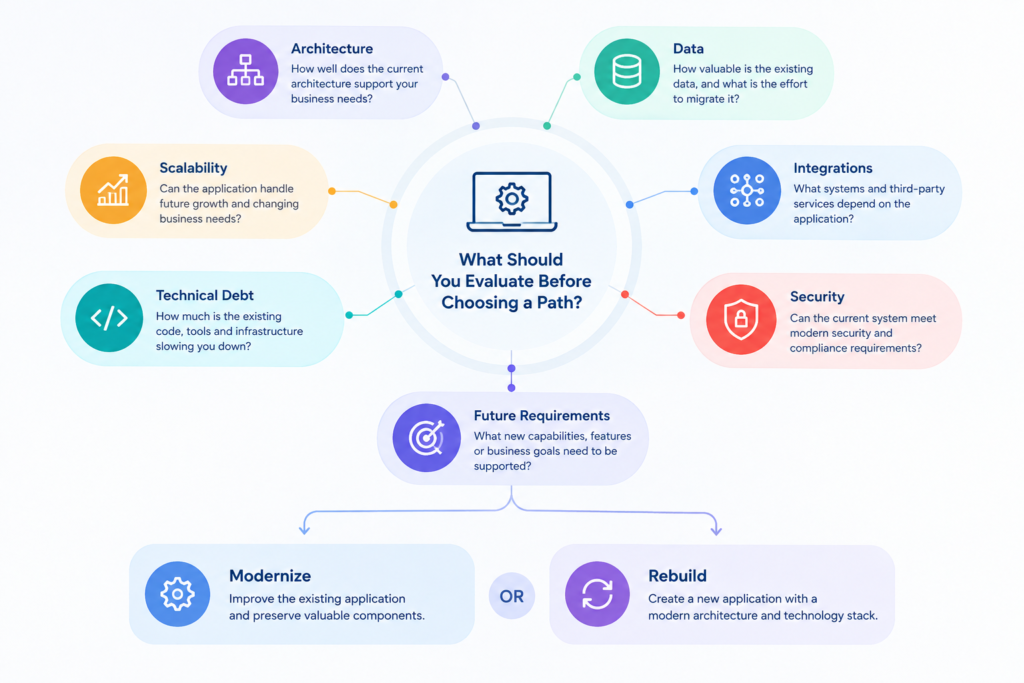
What Should You Evaluate Before Choosing a Path?
Before deciding between modernization and rebuilding, evaluate the application across several dimensions.
| Area | Questions to Ask |
|---|---|
| Business value | Which business processes depend on the application? |
| Architecture | How tightly coupled are the major components? |
| Code quality | Can developers safely modify the existing code? |
| Technology | Is the current technology still supportable? |
| Data | How complex would data migration be? |
| Integrations | How many external systems depend on the application? |
| Security | Can current and future security requirements be met? |
| Performance | Are current performance problems architectural or isolated? |
| Scalability | Can the system handle expected business growth? |
| Testing | Is there enough automated or regression testing to make changes safely? |
| Team | Can the organization maintain the existing technology? |
| Future requirements | Can the current architecture support the next stage of the business? |
| Migration risk | What happens if the transition takes longer than expected? |
A structured application modernization assessment can help organizations evaluate their existing application portfolio, define business goals, prioritize applications, and select an appropriate modernization strategy. Microsoft outlines these steps in its application modernization roadmap.
No single factor should determine the decision.
For example, an old technology stack does not automatically mean the entire application needs to be rebuilt. Likewise, a working application should not automatically be preserved if its architecture prevents the business from moving forward.
A Practical Decision Framework
A useful way to think about the decision is to ask four questions.
Question 1: Is the Business Logic Still Valuable?
If the answer is yes, determine how much of that logic can realistically be preserved.
Question 2: Can the Existing Architecture Support the Future?
If the application can be improved to support future requirements, modernization may be practical.
If fundamental architectural constraints prevent the required changes, rebuilding becomes more relevant.
Question 3: How Much Can Be Changed Safely?
Look at testing, documentation, dependencies, data, integrations, and operational knowledge.
The less predictable the system is, the more carefully the transition should be planned.
Question 4: What Is the Cost of Doing Nothing?
This question is often overlooked.
The cost of an outdated application is not limited to maintenance invoices.
It can include:
- Slower feature delivery
- Increasing development effort
- Operational risk
- Security exposure
- Difficulty hiring developers
- Poor user experience
- Integration limitations
- Lost opportunities to improve business processes
The comparison should therefore be between the cost and risk of changing the system and the cost and risk of keeping it as it is.
An Equal Efforts Example: Improving an Existing Application
Equal Efforts has worked on applications where the requirement was not simply to replace the existing system, but to maintain the application while introducing new capabilities.
In one e-commerce application project, the customer wanted to maintain the existing application while adding features according to ongoing business needs. The application used Java/JSP/Servlet technology along with several integrations and Elasticsearch.
The work included analyzing the existing application and workflows, optimizing modules, automating manual processes, improving responsiveness, documenting requirements, and migrating older technologies to improve performance.
This illustrates an important point about modernization:
An existing application does not always need to be discarded to become more capable.
In another Equal Efforts project, a recruitment application was designed to support evolving recruitment requirements while using .NET Core, SQL Server, Web API, React, Azure, and CI/CD practices. The project also included maintaining and extending an existing platform rather than treating the application as an isolated greenfield system.
These examples do not establish that modernization is always preferable to rebuilding. They demonstrate why the condition and role of the existing application need to be understood before selecting an approach.
Common Mistakes to Avoid
Rebuilding Because the Technology Is Old
An old framework is a signal to investigate, not necessarily a reason to replace the entire application.
First determine whether the underlying business capabilities remain valuable and whether the application can realistically be modernized.
Modernizing Without a Target Architecture
Incremental changes can become another layer of technical debt if there is no clear destination.
Before starting, define what the application should look like after modernization and how the interim stages will work.
Ignoring Data and Integrations
The application itself may be only one part of the system.
External APIs, databases, authentication systems, reporting tools, payment providers, and other applications can significantly affect the migration strategy.
Treating Modernization as Only a Technology Upgrade
Changing frameworks or moving an application to the cloud does not automatically solve business problems.
The modernization effort should also examine workflows, user experience, performance, security, maintainability, and operational requirements.
Trying to Change Everything at Once
Large transformations can become difficult to validate when too many components change simultaneously.
A phased approach can create opportunities to test assumptions and reduce the impact of individual migration steps.
The Right Starting Point Is Assessment, Not Technology
Before selecting a framework, cloud platform, architecture, or migration strategy, understand the application that exists today.
That assessment should cover:
- Business workflows
- Application architecture
- Code and technical debt
- Data structures
- Integrations
- Infrastructure
- Security
- Performance
- Testing
- Deployment
- Documentation
- Future business requirements
From there, the organization can identify which parts should be retained, modernized, replaced, or retired.
The result may be a modernization roadmap, a rebuild plan, or a combination of both.
Conclusion
The question is not simply whether legacy software should be modernized or rebuilt.
The better question is:
Which approach gives the business the safest and most practical path from its current system to the capabilities it needs next?
Modernization can make sense when the existing application contains valuable business logic and can be improved incrementally. Rebuilding may be appropriate when fundamental architectural or business changes make the existing foundation too restrictive. In other situations, phased modernization can provide a middle path by gradually replacing selected capabilities while keeping the existing system operational.
The decision should be based on evidence rather than the age of the technology.
A structured assessment of the application’s architecture, business value, data, integrations, technical debt, security, scalability, and future requirements can provide the foundation for choosing the right path.
For organizations evaluating an existing application, understanding what should be preserved, what needs to change, and what can be replaced gradually is often the most important first step.
Should I modernize or rebuild my legacy application?
It depends on the condition of the existing architecture, the value of its business logic, technical debt, data, integrations, future requirements, and migration risk. A technical assessment can help determine which approach is practical.
Is legacy software modernization cheaper than rebuilding?
Not necessarily. Modernization can reduce the need to replace everything at once, but complex legacy systems may require substantial refactoring. The appropriate comparison is the total cost, risk, and business impact of each approach.
Can a legacy application be modernized gradually?
Yes. A phased approach can allow individual components or business capabilities to be modernized while the existing system continues operating. Patterns such as the Strangler Fig approach are designed for incremental replacement.
When should a business consider rebuilding an application?
Rebuilding may be considered when technical debt and architectural constraints affect most of the application, the business has fundamentally changed, or the existing architecture cannot reasonably support required future capabilities.
Does moving a legacy application to the cloud count as modernization?
Cloud migration can be one part of modernization, but moving an application to the cloud does not automatically modernize its architecture or business processes. The appropriate modernization approach depends on the application’s current condition and desired future state.
