

Business Intelligence Sales Analytics for Customer Acquisition
Business intelligence sales analytics lets sales teams bring together call logs, lead‑source data, and conversion metrics in interactive dashboards. By modeling the data, tracking core KPIs, and adding predictive insights, organizations can spot funnel bottlenecks, prioritize high‑value prospects, and make more informed acquisition decisions.
Learn more about BI service overview.
Why is business intelligence sales analytics essential for modern sales organizations?
Sales leaders turn to business intelligence sales analytics to convert fragmented data into a single source of truth. Unified dashboards provide real‑time performance snapshots, cut down on manual reporting, and speed up decision‑making. When call outcomes, lead origins, and follow‑up activity are combined, teams can trace the full customer journey and see exactly where deals stall. This data‑driven view supports strategic planning, resource allocation, and continuous improvement across the sales organization.
What are the key BI metrics for sales teams?
A well‑designed dashboard should surface the most actionable sales performance KPIs:
| KPI | Why it matters |
|---|---|
| Call outcome rate (connected, no‑show, interested) | Shows effectiveness of outreach scripts and timing |
| Lead‑source conversion | Reveals which channels generate the strongest pipeline |
| Average follow‑up interval | Highlights responsiveness and its impact on win rates |
| Funnel stage velocity | Measures how quickly opportunities move forward |
| Win‑ratio by segment | Identifies product‑market fit and rep strengths |
Tracking these metrics together lets leaders compare performance across teams, regions, or product lines and quickly spot outliers that need attention.
How can dashboards reveal bottlenecks in the sales funnel?
Interactive visualizations let users drill down from a high‑level funnel view to individual call records. Common cues include:
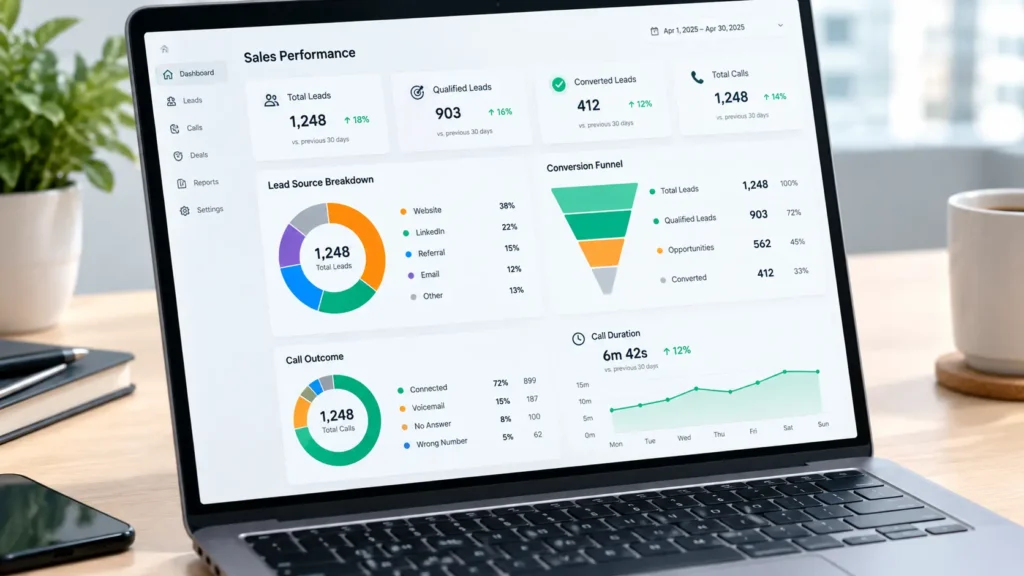
- Funnel charts with color‑coded stages that convert more slowly.
- Heat maps of lead‑source performance, highlighting under‑performing channels.
- Alert widgets that fire when follow‑up intervals exceed a set threshold.
By combining these views, a sales director can instantly see, for example, that inbound leads from webinars convert at a lower rate than paid ads, or that opportunities linger longer in qualification. Such insights drive coaching, budget reallocation, and process redesign.
Why is data modeling important for sales call analysis?
Data modeling organizes raw call logs, CRM records, and marketing attribution into a structured schema that BI tools can query efficiently. A solid model:
- Standardizes fields (e.g., call outcome codes, lead‑source taxonomy).
- Creates relationships between contacts, opportunities, and activities.
- Aggregates metrics at the appropriate grain (daily, weekly, per rep).
Without this foundation, dashboards become slow, inconsistent, or misleading. Techniques such as star schemas in a data warehouse enable quick slice‑and‑dice analysis and set the stage for predictive analytics.
Which BI tools integrate best with sales CRM systems?
Most leading platforms offer native connectors for popular CRMs and call‑recording systems. The three tools most often highlighted Power BI, Tableau, and Looker provide out‑of‑the‑box integrations that simplify data ingestion and refresh schedules.
- Power BI includes built‑in connectors for Microsoft Dynamics and Salesforce, plus custom APIs for call‑center platforms.
- Tableau supports drag‑and‑drop connections to cloud‑based CRMs and can blend data from multiple sources in a single workbook.
- Looker uses LookML to define reusable data models, making it easy to join call outcome tables with lead‑source tables.
These integrations reduce ETL overhead and keep dashboards current with minimal manual effort.
Can predictive analytics improve customer acquisition?
Predictive analytics applies machine learning to historical sales data to forecast future outcomes. In a sales context, models can estimate:
- Lead scoring – probability that a prospect will close based on source, engagement, and call sentiment.
- Deal win likelihood – chance of closing an opportunity given stage duration and rep activity.
- Revenue projection – expected pipeline value over the next quarter.
When embedded in a BI dashboard, forecasts appear as confidence bands or recommendation tags, helping managers focus on high‑probability leads and allocate resources where they will have the greatest impact.
Should sales leaders prioritize lead‑source tracking in BI?
Yes. Lead‑source tracking is a foundational element of customer acquisition BI. Knowing which campaigns, events, or referrals generate the most qualified opportunities allows marketers and sales leaders to:
- Optimize spend on high‑performing channels.
- Refine messaging for under‑performing sources.
- Align outreach cadence with source‑specific buyer behavior.
A dedicated lead‑source widget on the dashboard, paired with conversion metrics, turns raw attribution data into actionable strategy.
How does business intelligence sales analytics drive customer acquisition?
When you adopt business intelligence sales analytics, you create a feedback loop between data and action. The unified view highlights which prospect segments respond best to outreach, enabling marketers to tailor campaigns and reps to focus on the most promising leads. Over time, this alignment can raise conversion rates and shorten sales cycles, all while providing a transparent basis for performance reviews.
How to integrate sales data sources into a unified BI platform
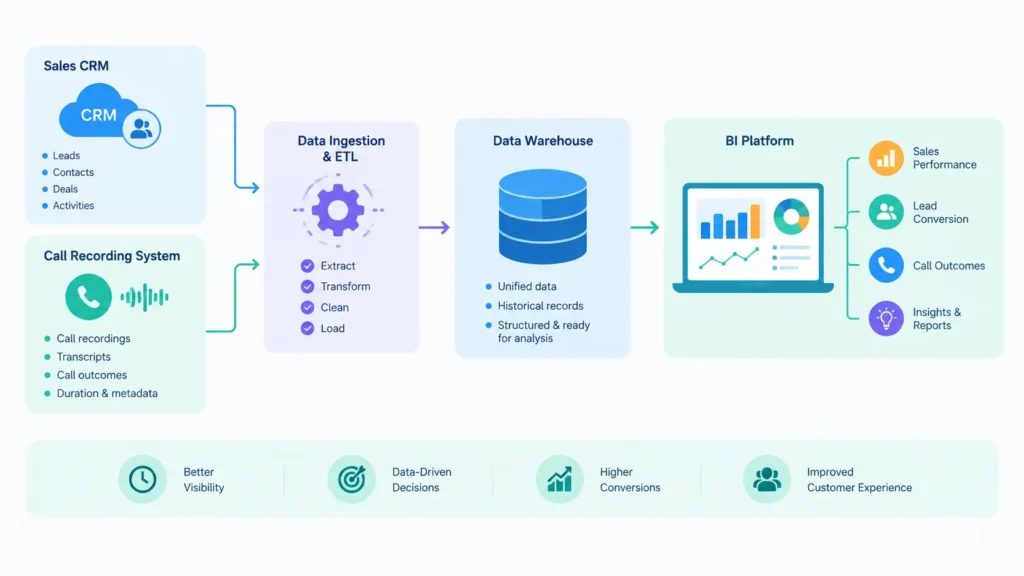
- Identify source systems – CRM (e.g., Salesforce), call‑recording tools, marketing automation, and external lead databases.
- Extract data – Use native connectors or scheduled exports to pull raw tables into a staging area.
- Transform and model – Clean, deduplicate, and map fields to a unified schema; create fact and dimension tables for calls, leads, and opportunities.
- Load into a data warehouse – Store the modeled data in a cloud‑based warehouse for scalable querying.
- Connect the BI tool – Link Power BI, Tableau, or Looker to the warehouse and build dashboards on top of the curated model.
This pipeline ensures that call outcomes, lead‑source information, and conversion metrics are refreshed regularly and available for analysis.
Designing interactive dashboards that surface bottlenecks
- Drill‑through filters let users click a funnel segment and view underlying call logs.
- Conditional formatting highlights conversion rates that fall below target thresholds.
- Real‑time alerts (e.g., “Opportunity aging > 30 days”) prompt immediate follow‑up.
- What‑if scenario panels let users adjust lead‑scoring weights and see projected pipeline changes.
Learn more about AI‑enhanced BI solutions.
A clean layout with a top‑level funnel, middle‑level source breakdown, and bottom‑level call‑outcome details keeps the dashboard intuitive for both executives and front‑line reps.
Key Takeaways
- Business intelligence sales analytics consolidates call data, lead sources, and conversion metrics into a single, actionable view.
- Core sales performance KPIs such as call outcome rate and lead‑source conversion guide continuous improvement.
- Robust data modeling and warehousing are prerequisites for fast, reliable dashboards.
- Power BI, Tableau, and Looker provide native integrations that streamline data pipelines.
- Predictive analytics can prioritize high‑value leads, but should complement not replace human judgment.
Frequently Asked Questions
What are the best KPIs for tracking sales conversion patterns?
Focus on call outcome rate, lead‑source conversion %, average follow‑up interval, funnel stage velocity, and win‑ratio by segment. Together they reveal where prospects drop off and which activities drive closures.
How does a BI dashboard help identify bottlenecks in the sales funnel?
Dashboards visualize each funnel stage, apply color‑coded alerts for slow‑moving stages, and allow drill‑down to individual call records. This immediate visibility pinpoints the exact step where deals stall.
Why should I invest in data modeling before building sales dashboards?
Data modeling standardizes fields, defines relationships, and aggregates metrics at the right granularity. A clean model ensures dashboards load quickly, return accurate numbers, and support advanced analytics like predictive scoring.
Which BI tool should I choose for integrating with my CRM?
Power BI, Tableau, and Looker all offer native connectors for major CRMs and call‑recording systems. Choose based on your existing technology stack, licensing preferences, and the level of custom modeling you require.
