
Modernize Legacy J2EE with Spring Boot
What are the key steps to modernize legacy J2EE with Spring Boot?
- Assess the current landscape – catalog servlets, EJBs, XML descriptors, and third‑party jars.
- Define migration boundaries – decide which pieces will become independent Spring Boot services and which can stay in the monolith for a later wave.
- Extract business logic – move POJOs, domain models, and service classes into plain Maven/Gradle modules that no longer depend on J2EE APIs.
- Create Spring Boot starters – replace
web.xmlandejb-jar.xmlwith@SpringBootApplication,@RestController, and@Transactionalannotations. - Specify API contracts – use OpenAPI/Swagger to describe the new endpoints and verify they match the original contracts.
- Write integration tests – confirm that the refactored service returns the same results as the legacy component.
- Containerize – build a lightweight Docker image for each service (e.g.,
FROM eclipse-temurin:17-jdk). - Deploy to Kubernetes – craft Deployments, Services, and ConfigMaps for configuration and secrets.
- Set up CI/CD – automate compile, test, image build, and rollout with pipelines such as GitHub Actions or Jenkins.
Following this incremental path lets teams roll back to the original J2EE version if needed and keeps risk manageable.
How can cloud‑native DevOps patterns improve scalability when you modernize legacy J2EE with Spring Boot?
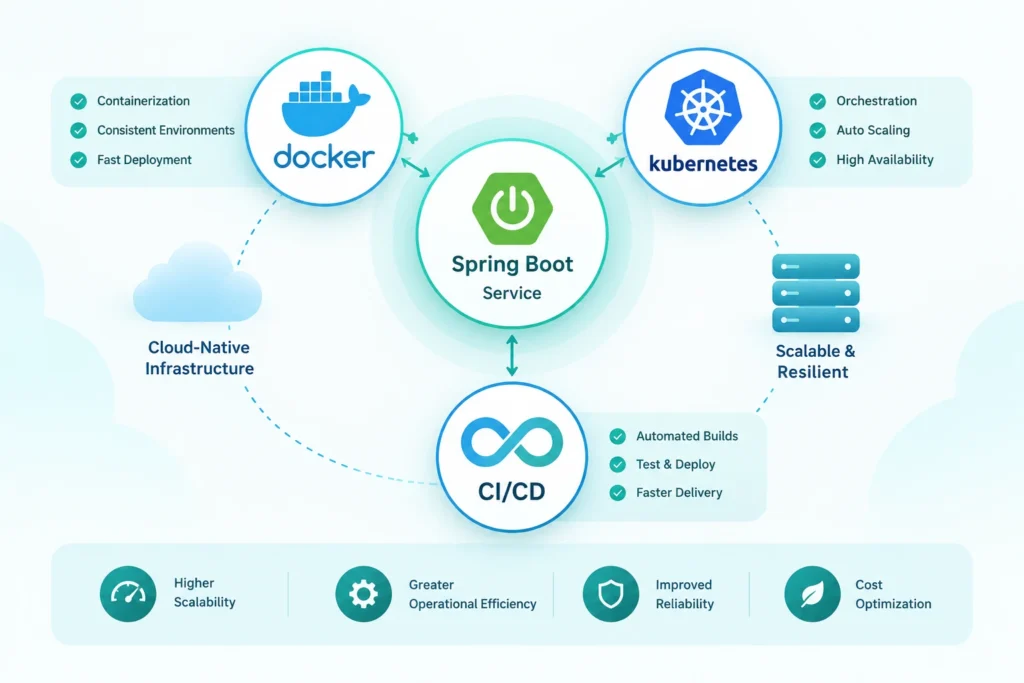
- Containerization isolates each Spring Boot service, making horizontal scaling as simple as adding pod replicas.
- Kubernetes orchestration supplies self‑healing, auto‑scaling, and rolling updates—features that are hard to achieve with a traditional J2EE server cluster.
- CI/CD pipelines guarantee that every code change passes automated tests and reaches production in a consistent way, reducing configuration drift.
- Observability stack (Prometheus, Grafana, OpenTelemetry) provides real‑time metrics on latency, throughput, and resource usage, helping teams make proactive scaling decisions.
Together, these practices turn a monolithic J2EE app—often limited by fixed thread pools and heavyweight servers—into a set of elastic services that grow with demand.
Why should senior Java engineers choose Spring Boot for legacy migration?
- Convention over configuration cuts the boilerplate that dominates J2EE XML descriptors.
- Embedded server (Tomcat, Jetty, or Undertow) removes the need for separate application‑server management.
- Rich ecosystem offers starters for data access, security, and messaging, accelerating development.
- Active community delivers frequent updates, security patches, and a wealth of examples for common migration challenges.
Image Prompt: High‑detail illustration of a developer workstation with code editors displaying J2EE XML config on one screen and Spring Boot Java annotations on another, ambient office lighting, muted colors
Image Description: Developer comparing J2EE config with Spring Boot code
Image Filename: modernize-legacy-j2ee-with-spring-boot-j2ee-vs-spring-boot.webp
Spring Boot’s tight integration with Docker, Kubernetes, and CI/CD makes it a natural fit for teams that want to modernize without rewriting business rules from scratch.
Which tools help integrate Apache Kafka during a J2EE to Spring Boot transition?
| Tool / Library | Role in Migration | Typical Use |
|---|---|---|
| spring‑kafka | Spring Boot starter for Kafka | Produce and consume messages with minimal configuration. |
| Confluent Platform | Managed Kafka cluster (optional) | Provides schema registry and monitoring dashboards. |
| Kafka Connect | Data pipeline connector | Streams legacy database changes into Kafka topics for downstream services. |
| Testcontainers | Integration testing | Spins up a temporary Kafka broker for automated tests. |
These utilities let engineers decouple tightly coupled J2EE components by publishing events to Kafka, allowing new Spring Boot services to react asynchronously while the old system continues to run.
Can legacy business logic be preserved when moving to Spring Boot microservices?
Yes. The migration strategy focuses on behavioral preservation rather than wholesale rewrites. Techniques that help include:
- Domain‑driven extraction – isolate core domain classes and services from J2EE‑specific APIs.
- Automated regression suites – run existing J2EE integration tests against the new Spring Boot endpoints.
- Feature toggles – expose both old and new implementations behind a flag, enabling a gradual traffic shift.
- Contract testing – use tools like Pact to verify that request/response schemas stay unchanged.
Treating business logic as a reusable library lets multiple microservices share the same algorithms, reducing duplication and risk.
How to modernize legacy J2EE with Spring Boot step‑by‑step?
- Create a migration backlog – list each J2EE module and rank it by business value and technical risk.
- Prototype a Spring Boot wrapper – build a small service that calls the existing J2EE code via a thin façade.
- Validate behavior – run the same functional tests against the wrapper to ensure parity.
- Iterate – replace the façade with a native Spring Boot implementation once confidence grows.
Learn more about Apache Kafka integration with Spring Boot.
Repeating this loop across the codebase provides a clear path to fully modernize legacy J2EE with Spring Boot while keeping production stable.
What tools assist when you modernize legacy J2EE with Spring Boot?
- Spring Initializr – quickly generate a starter project with the needed dependencies.
- Maven/Gradle plugins – help convert legacy build scripts to modern ones.
- JRebel or HotSwap – speed up development by reloading classes without full restarts.
- Docker Compose – spin up local containers for databases, Kafka, and other services to mirror production environments.
These tools reduce manual effort and make the migration experience smoother.
Implementing Cloud‑Native DevOps Practices
- Dockerfile example
   FROM eclipse-temurin:17-jdk
   COPY target/app.jar /app.jar
ENTRYPOINT ["java","-jar","/app.jar"]- Kubernetes manifest snippet
   apiVersion: apps/v1
   kind: Deployment
   metadata:
     name: order-service
   spec:
     replicas: 3
     selector:
       matchLabels:
         app: order-service
     template:
       metadata:
         labels:
           app: order-service
       spec:
         containers:
         - name: app
           image: registry.example.com/order-service:latest
           ports:
- containerPort: 8080- CI/CD pipeline outline
- Build stage – compile with Maven, run unit tests, create Docker image.
- Security scan – static analysis and container vulnerability check.
- Deploy stage – apply Kubernetes manifests to a staging namespace, run integration tests.
- Promotion – on success, promote the image to production with a rolling update.
These steps create a repeatable, automated path from code commit to production, minimizing the manual effort that traditionally slowed J2EE releases.
Key Takeaways
- Inventory existing J2EE components before touching code.
- Extract business logic into reusable libraries and annotate with Spring Boot constructs.
- Containerize each service and orchestrate with Kubernetes for true elasticity.
- Adopt CI/CD pipelines to enforce quality and speed delivery.
- Leverage Apache Kafka to decouple services and enable event‑driven communication during migration.
Frequently Asked Questions
How do I decide which J2EE modules become separate Spring Boot microservices?
Start with high‑traffic or loosely coupled modules (e.g., reporting, authentication). Look at data ownership, transaction boundaries, and team expertise. Splitting one module at a time keeps risk low and provides early feedback.
Should I adopt CI/CD pipelines when modernizing Java enterprise apps?
Yes. CI/CD automates testing, builds, and deployments, ensuring each incremental change is validated. This reduces the chance of regressions that are common in large monolithic upgrades.
What are common pitfalls when containerizing Spring Boot services?
Missing environment variables, hard‑coded file paths, and insufficient heap settings can cause runtime failures. Use Docker health checks and configure resource limits to avoid container crashes.
Can I keep the original J2EE application running while migrating?
Absolutely. Feature toggles or API gateways can route traffic to either the legacy system or the new Spring Boot service, allowing a phased cutover without downtime.
How does Apache Kafka help during the migration?
Kafka acts as an event bus that decouples producers (legacy components) from consumers (new microservices). It enables asynchronous data flow, reduces tight coupling, and provides a buffer for gradual migration.
