
LangChain4j Spring Boot tutorial: Building Conversational AI Services
A LangChain4j Spring Boot tutorial is a great starting point for Java developers who want to build intelligent, AI-powered conversational applications using Large Language Models (LLMs).
AI-powered chat applications are transforming how businesses interact with customers, employees, and enterprise systems. From customer support assistants to internal knowledge bots, organizations are increasingly integrating Large Language Models (LLMs) into their existing applications to make information more accessible and workflows more intelligent.
For Java developers working with Spring Boot, LangChain4j makes it easier to integrate LLMs into enterprise applications without leaving the Java ecosystem.
In this tutorial, we’ll build a simple AI-powered chat application using Spring Boot, LangChain4j, and OpenAI. We’ll then explore how to extend it to securely retrieve information from enterprise data sources using Retrieval-Augmented Generation (RAG).
From traditional Java applications to intelligent, data-driven conversational experiences, let’s explore how to build AI-powered applications with Java and Spring Boot.
What is LangChain4j?
LangChain4j is an open-source Java library designed to simplify the integration of Large Language Models into Java applications.
It provides a unified API for interacting with different LLM providers, embedding models, vector databases, and other AI components. Rather than implementing provider-specific integrations from scratch, developers can use standardized abstractions to build AI-driven applications.
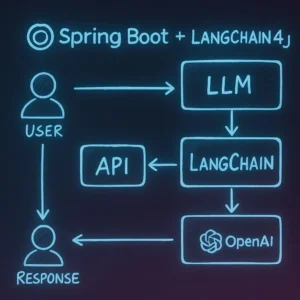
LangChain4j provides capabilities such as:
-
AI Services: Simplify LLM interactions through Java interfaces.
-
Chat Memory: Maintain conversational context across multiple interactions.
-
RAG (Retrieval-Augmented Generation): Connect AI models with enterprise knowledge and documents.
-
Tools: Allow AI applications to interact with business services and external systems.
-
Model integrations: Connect to different LLM providers and embedding services.
These capabilities make LangChain4j a practical choice for integrating AI into existing Java and Spring Boot applications.
What are the benefits of following a LangChain4j Spring Boot tutorial?
A LangChain4j Spring Boot tutorial lets Java developers work with large language models without wrestling with raw HTTP calls. The combination offers:
- Fast bootstrapping – Spring Boot’s auto‑configuration and embedded server let you stand up a microservice in minutes.
- Unified dependency management – Maven or Gradle keeps LangChain4j libraries in sync with other Spring modules.
- Built‑in security – Spring’s property encryption and profile‑based configuration keep API keys out of source code.
- Scalable design – Reactive programming support and container‑ready packaging handle high‑throughput chat traffic.
These traits make the tutorial a practical route to production‑ready conversational AI.
How can I integrate a large language model using a LangChain4j Spring Boot tutorial?
The integration typically follows these steps:
1. Prerequisites
Before starting, make sure you have the following:
| Technology | Requirement |
|---|---|
| Java | Java 17 or later |
| Spring Boot | Spring Boot 3.5+ |
| Maven | Maven 3.8+ |
| LangChain4j | 1.24.1 (stable version referenced in the current documentation) |
| LLM Provider | OpenAI API access |
| IDE | IntelliJ IDEA, Eclipse, or VS Code |
LangChain4j’s current Spring Boot integration supports Spring Boot 3.5+ and Spring Boot 4+, and requires Java 17 or later. Verify the starter version against the official documentation before using it in production.
2. Create a Spring Boot project
Create a Spring Boot application using Spring Initializr.
Select the following dependencies:
-
Spring Web
-
Spring Boot DevTools (optional)
- Lombok (optional)
You can create the project through Spring Initializr.
For this tutorial, we’ll use Maven and a standard Spring Boot application structure.
3. Add LangChain4j dependencies
Add the following dependencies to your pom.xml.
<properties>
<langchain4j.version>1.24.1</langchain4j.version>
</properties>

<dependencies>
<!-- Spring Boot Web -->
<dependency>
<groupId>org.springframework.boot</groupId>
<artifactId>spring-boot-starter-web</artifactId>
</dependency>

<!-- LangChain4j OpenAI integration -->
<dependency>
<groupId>dev.langchain4j</groupId>
<artifactId>langchain4j-open-ai-spring-boot-starter</artifactId>
<version>${langchain4j.version}</version>
</dependency>

<!-- LangChain4j AI Services -->
<dependency>
<groupId>dev.langchain4j</groupId>
<artifactId>langchain4j-spring-boot-starter</artifactId>
<version>${langchain4j.version}</version>
</dependency>
</dependencies>
We’re using the LangChain4j OpenAI integration and the Spring Boot AI Services starter.
4. Configure the AI model
Once the dependencies are installed, configure the OpenAI chat model in your application.properties file.
langchain4j.open-ai.chat-model.api-key=${OPENAI_API_KEY}
langchain4j.open-ai.chat-model.model-name=gpt-4o-mini
langchain4j.open-ai.chat-model.temperature=0.7
Instead of hardcoding API keys into your application, use environment variables or a secure secrets management system.
For example, configure your environment variable:
export OPENAI_API_KEY=your_api_keyLangChain4j will automatically configure the chat model using the provided properties.
5. Create the AI Assistant
One of the most useful features of LangChain4j is its AI Services abstraction.
Instead of manually constructing requests, managing prompts, and parsing responses for every interaction, developers can define a Java interface and let LangChain4j handle the underlying orchestration.
Create an interface named ChatAssistant.java.
package com.example.ai.service;

import dev.langchain4j.service.SystemMessage;
import dev.langchain4j.service.UserMessage;
import dev.langchain4j.service.MemoryId;
import dev.langchain4j.service.spring.AiService;

@AiService
public interface ChatAssistant {

    @SystemMessage("""
        You are a helpful AI assistant.
        Provide accurate, concise and professional responses.
        If you don't know the answer, clearly state that.
        """)
    String chat(@MemoryId String conversationId,
                @UserMessage String message);
}
This example uses the current declarative AI Service approach. Depending on your LangChain4j version, verify the exact annotation package and starter configuration in the documentation.
How does this work?
@AiServiceInstructs the Spring integration to create and register the AI Service.@SystemMessageDefines the assistant’s behavior and instructions.@UserMessageIdentifies the user input.@MemoryIdIdentifies the conversation whose memory should be used.
LangChain4j provides automatic integration for AI Services with chat models and related components when configured in the Spring context.
6. Add conversational memory
A chatbot that responds to individual messages is useful, but a conversational assistant needs to understand the context of previous messages.
For example:
- User: What is LangChain4j?
- AI: LangChain4j is a Java library for integrating LLMs.
- User: Can I use it with Spring Boot?
Without conversational memory, the AI may not understand what the user is referring to.
With chat memory, the assistant can retain the relevant conversational context.
In this tutorial, we use a conversation identifier to distinguish conversations.
The @MemoryId parameter in the previous interface allows LangChain4j to associate messages with a conversation. Configure a ChatMemoryProvider to supply a separate memory instance for each conversation.
package com.example.ai.config;

import dev.langchain4j.memory.chat.ChatMemoryProvider;
import dev.langchain4j.memory.chat.MessageWindowChatMemory;
import org.springframework.context.annotation.Bean;
import org.springframework.context.annotation.Configuration;

@Configuration
public class ChatMemoryConfig {

    @Bean
    public ChatMemoryProvider chatMemoryProvider() {
        return memoryId -> MessageWindowChatMemory.builder()
                .id(memoryId)
                .maxMessages(20)
                .build();
    }
}
Why use a conversation ID?
A conversation ID allows the application to maintain separate conversational histories.
However, in production, conversation IDs should not be treated as authorization credentials. They must be validated against the authenticated user or tenant. A client should never be able to access another user’s conversation simply by submitting a different ID.
7. Create the REST API
Now, expose your AI assistant through a REST endpoint.
Create ChatController.java.
package com.example.ai.controller;

import com.example.ai.service.ChatAssistant;
import org.springframework.web.bind.annotation.*;

@RestController
@RequestMapping("/api/chat")
public class ChatController {

    private final ChatAssistant chatAssistant;

    public ChatController(ChatAssistant chatAssistant) {
        this.chatAssistant = chatAssistant;
    }

    @PostMapping
    public ChatResponse chat(@RequestBody ChatRequest request) {

        String response = chatAssistant.chat(
                request.getConversationId(),
                request.getMessage()
        );

        return new ChatResponse(response);
    }
}
ChatRequest.java
package com.example.ai.controller;

public class ChatRequest {

    private String conversationId;
    private String message;

    public String getConversationId() {
        return conversationId;
    }

    public void setConversationId(String conversationId) {
        this.conversationId = conversationId;
    }

    public String getMessage() {
        return message;
    }

    public void setMessage(String message) {
        this.message = message;
    }
}
ChatResponse.java
package com.example.ai.controller;

public class ChatResponse {

    private final String response;

    public ChatResponse(String response) {
        this.response = response;
    }

    public String getResponse() {
        return response;
    }
}
This API accepts a user message and conversation identifier, invokes the AI Service, and returns the generated response.
8. Test the chatbot API
Once the application is running, test the endpoint using Postman or curl.
Request
http://localhost:8080/api/chat
{
  "conversationId": "conversation-1001",
  "message": "What is LangChain4j?"
}
Response
{
  "response": "LangChain4j is an open-source Java library that simplifies integrating Large Language Models into Java applications. It provides abstractions for chat models, AI services, memory, tools, and retrieval-based workflows."
}
Try another request using the same conversation ID:
{
  "conversationId": "conversation-1001",
  "message": "Can you explain how it integrates with Spring Boot?"
}
Because the conversation ID remains the same, the assistant can use the previous conversation context.
At this point, you have successfully created a basic AI-powered chatbot using Spring Boot and LangChain4j.
But for enterprise applications, the real value of AI comes from connecting it to business data.
9. Connect the chatbot to enterprise data using RAG
This is where an AI chatbot becomes a business application.
A basic chatbot relies primarily on the knowledge learned during model training. Enterprise applications, however, often need to answer questions based on internal documents, product catalogs, policies, customer records, knowledge bases, or operational data.
This is where Retrieval-Augmented Generation (RAG) becomes useful.
RAG allows an application to retrieve relevant information from its own data sources and provide that information to an LLM as context when generating an answer.
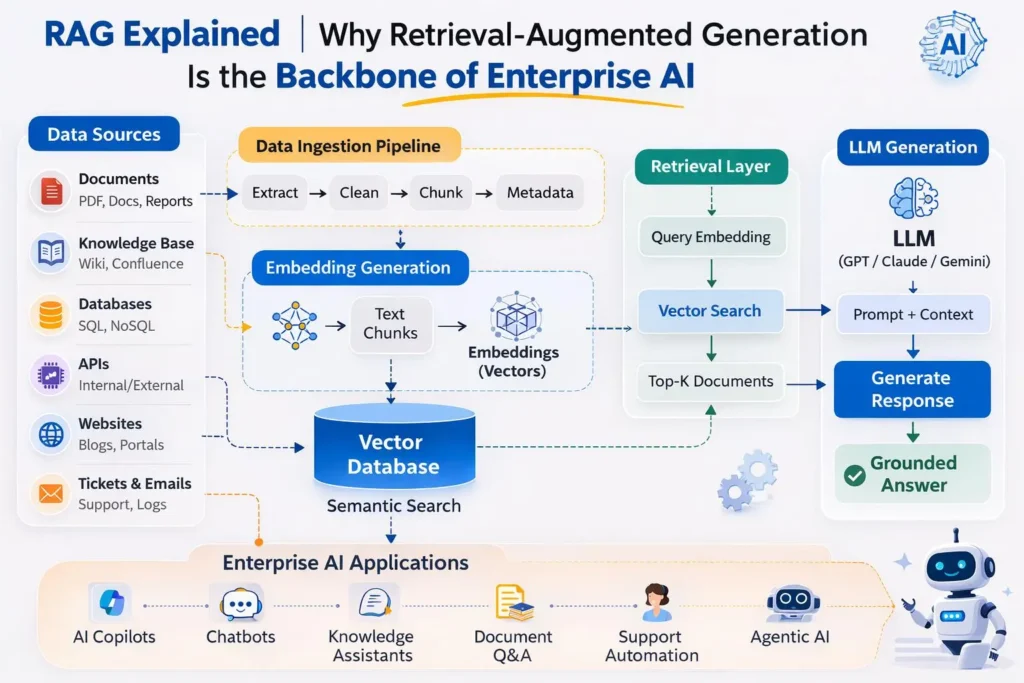
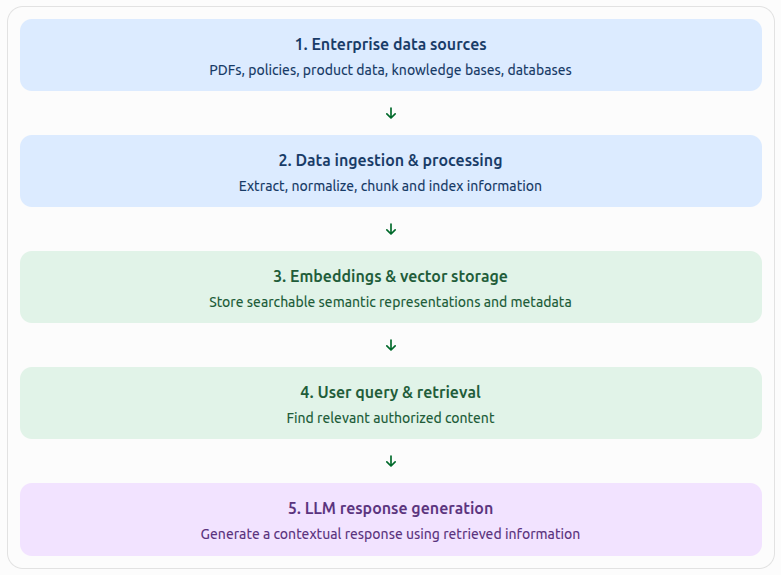
How RAG works
Learn more about AI Automation solutions.
Frequently Asked Questions (FAQs)
1. What is LangChain4j, and why should Java developers use it?
LangChain4j is a Java library that simplifies integrating Large Language Models (LLMs) into Java applications. It provides abstractions for AI Services, chat memory, embeddings, tools, and Retrieval-Augmented Generation (RAG), making it easier for Java developers to build AI-powered applications within their existing ecosystem.
2. Can LangChain4j be integrated with Spring Boot?
Yes. LangChain4j provides Spring Boot starters that simplify configuring LLM providers, AI Services, chat memory, and other AI components. Developers can integrate AI capabilities into Spring Boot applications using familiar dependency injection and application configuration patterns.
3. Which LLM providers can be integrated with LangChain4j?
LangChain4j supports integrations with several LLM providers, including OpenAI, Google AI, Anthropic, Azure OpenAI, Ollama, and others. The availability of specific models and integrations depends on the LangChain4j version and provider.
4. What is Retrieval-Augmented Generation (RAG) in LangChain4j?
Retrieval-Augmented Generation (RAG) is an approach that enables AI models to generate responses using relevant information retrieved from external data sources.
With LangChain4j, developers can build RAG workflows that connect AI applications to internal documents, databases, product catalogs, knowledge bases, and other enterprise information sources without relying exclusively on the model’s pre-trained knowledge.
5. Can LangChain4j access enterprise databases and internal documents?
Yes. LangChain4j can be integrated with enterprise databases, document repositories, APIs, and other data sources. Developers can implement retrieval mechanisms that fetch relevant information and provide it to the LLM as context when answering user questions.
Access permissions should be enforced at the application and data layers to ensure that users can retrieve only authorized information.
6. Is LangChain4j suitable for building secure enterprise AI applications?
Yes, LangChain4j can be used as part of secure enterprise AI architectures. However, security depends on how the application is designed and implemented.
Organizations should implement authentication, authorization, tenant isolation, secure credential management, data filtering, audit logging, and appropriate AI governance controls to protect enterprise information.
7. Can LangChain4j maintain chat history and conversational context?
Yes. LangChain4j supports chat memory, enabling AI applications to maintain conversational context across multiple interactions. Developers can associate memory with conversation identifiers and configure memory management strategies based on application requirements.
For production applications, chat history should be managed securely and associated with authenticated users.
8. Can LangChain4j be used with PostgreSQL?
Yes. PostgreSQL can be integrated with LangChain4j as part of an AI application’s data architecture. With extensions such as pgvector, PostgreSQL can also store and search vector embeddings, enabling semantic retrieval for RAG-based applications.
This can be particularly useful for organizations that already use PostgreSQL and want to introduce AI-powered search or knowledge assistants.
9. Can LangChain4j be used to build AI chatbots for customer support?
Yes. LangChain4j can be used to build customer support assistants that answer questions using product information, FAQs, company policies, customer documentation, and other authorized data sources.
These applications can also be extended with business tools, APIs, workflow automation, and human escalation mechanisms.
10. How can businesses get started with AI application development using LangChain4j?
Businesses can start by identifying a specific use case, such as an internal knowledge assistant, customer support chatbot, document search application, or AI-powered workflow.
A proof-of-concept can help validate the business value, data availability, security requirements, and technical feasibility before moving to production.
Conclusion
LangChain4j brings powerful AI integration capabilities to the Java ecosystem, making it easier for Spring Boot developers to build conversational AI applications, manage chat memory, connect enterprise data, and implement retrieval-based workflows.
By combining Spring Boot, LangChain4j, LLMs, enterprise data, and robust security practices, organizations can move beyond simple chatbots and build intelligent applications that deliver meaningful business value.
The opportunity is not just to build an AI chatbot, but to make your existing applications smarter, more accessible, and more efficient.
